What Type of Rack Card Is Right for My Project?
Rack cards are small, simple, and easy to overlook.
Until you need one to explain something quickly.
A good rack card can promote a service, introduce a business, explain an event, share a menu, provide directions, highlight an offer, or give someone the next step to take.
The format is compact, but there are still a few decisions to make.
Size. Paper. Coating. One-sided or two-sided printing. Quantity. Display location. Whether you need a QR code. Whether the card needs to work on its own or as part of a larger campaign.
This guide will help you sort through the options.
What Is a Rack Card?
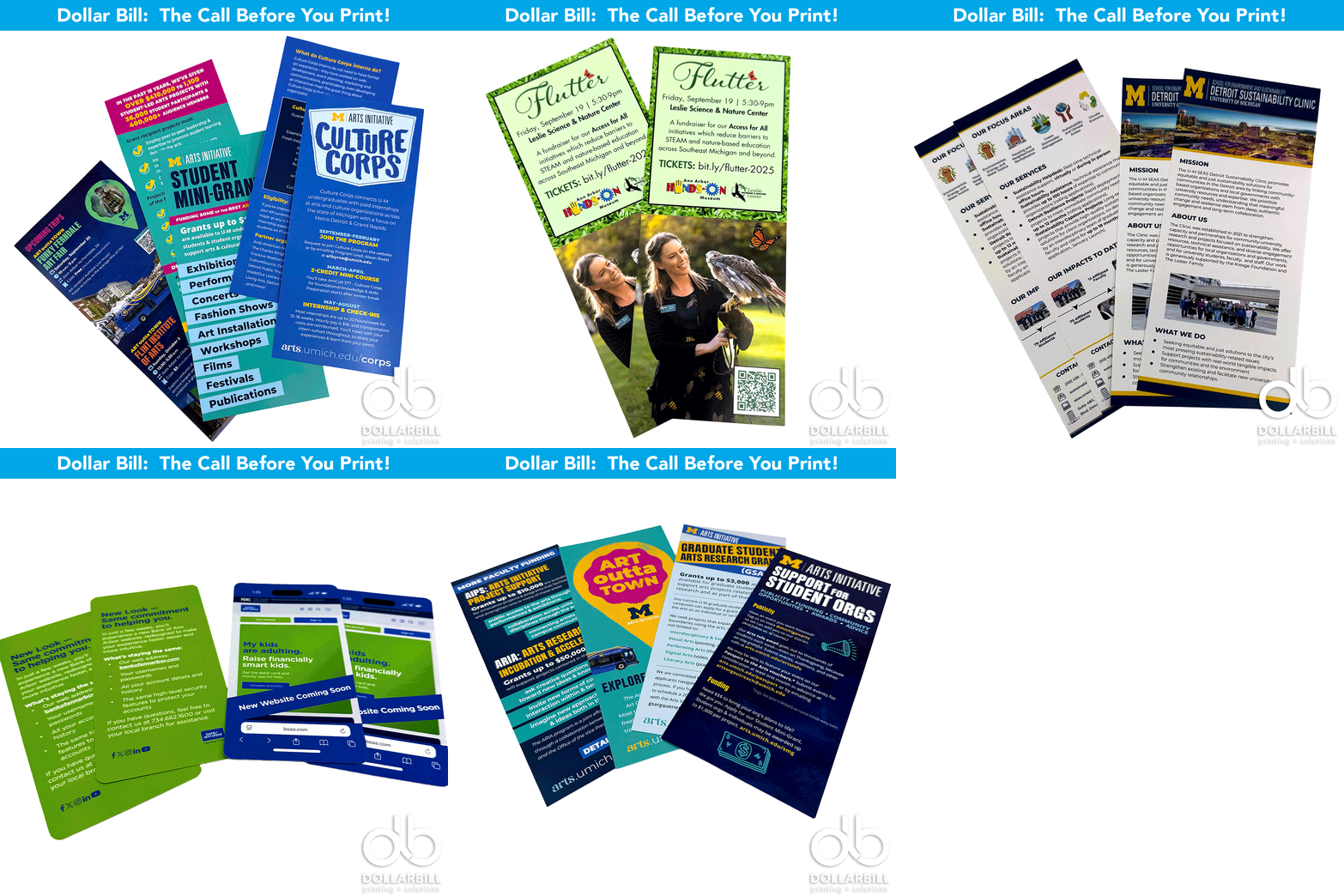
A rack card is a tall, narrow printed piece designed to be displayed in racks, counters, reception areas, visitor centers, hotels, offices, and other places where people can pick one up.
The most common size is around 4" × 9", although other sizes can work depending on the project.
They are easy to distribute, inexpensive to produce, and large enough to give someone useful information without becoming overwhelming.
Why Use Rack Cards?
Rack cards work especially well when you need something people can grab quickly.
Common uses include:
Hotels and tourism
Restaurants
Events
Museums
Schools and universities
Healthcare
Nonprofits
Real estate
Retail
Service businesses
Visitor information
Community organizations
Trade shows
They are also useful when you want to place printed information in several locations without taking up much space.
Standard Rack Cards
The classic rack card is a single, flat piece printed on both sides.
The front usually gets attention.
The back does the explaining.
Best For
Business overviews
Service information
Event promotion
Attractions
Tourism
Restaurant information
Community programs
General marketing
This is the simplest and most versatile version.
One-Sided Rack Cards
Not every project needs two printed sides.
If the message is extremely simple, a one-sided card may be enough.
Best For
Simple announcements
Short-term promotions
Event reminders
Price lists
QR-code-driven campaigns
Basic instructions
A one-sided card can also reduce cost when the back does not add much value.
That said, the back is useful real estate. If you have something worthwhile to say, use it.
Two-Sided Rack Cards
Two-sided printing gives you more room to organize the message.
A common approach is:
Front
Strong headline
Main image
Logo
Key benefit
Short call to action
Back
Additional details
Hours
Contact information
Pricing
Directions
QR code
Website
Social information
For most marketing projects, two-sided rack cards give you the best balance of space and simplicity.
What Size Should I Use?
The traditional rack card size is roughly 4" × 9".
That size works well because it fits many standard display racks and gives you enough room for useful information.
But not every card needs to be standard.
Other sizes can work if:
The card will not sit in a traditional rack
You need more room for information
You want a more distinctive shape
The piece will be mailed
The card needs to coordinate with another printed piece
Before changing the size, think about where the finished piece will actually live.
If it needs to fit an existing rack, measure first.
What Paper Should I Choose?
Paper changes how the rack card feels.
A heavier stock can feel more substantial and hold up better when people handle it.
A lighter stock may be more economical for large quantities or short-term campaigns.
Heavier Card Stock
Good for:
Long-term displays
Premium brands
Sales materials
Tourism
Frequently handled cards
High-traffic locations
Lighter Stock
Good for:
Large quantities
Short campaigns
Event handouts
Budget-conscious projects
Temporary displays
The right choice depends on how long the card needs to last and how it will be used.
Coated or Uncoated?
The finish can change both the look and feel.
Gloss Coated
Gloss helps photos and colors stand out.
Good for:
Tourism
Food
Events
Photography-heavy designs
Bright promotional pieces
Matte or Dull Coated
A matte finish feels smoother and less reflective.
Good for:
Professional services
Universities
Healthcare
Corporate communication
Designs with more text
Uncoated
Uncoated paper has a natural feel and is easier to write on.
Good for:
Appointment reminders
Notes
Forms
Handwritten information
Organizations that want a softer look
If people need to write on the card, uncoated stock is usually the safer choice.
Should I Add a Coating?
Some rack cards benefit from an added coating for appearance or durability.
Possible options may include:
Gloss coating
Matte coating
UV coating
Soft-touch finishes
Other specialty finishes
A coating can help protect the printed surface and make colors feel more polished.
It is especially useful when the cards will sit in busy public spaces for a long time.
Should I Use a QR Code?
Usually, yes if there is somewhere useful to send people.
A QR code can connect the printed rack card to:
Registration
Tickets
Online ordering
Maps
Videos
Event schedules
Menus
Contact forms
Product pages
Donations
Appointment scheduling
The printed piece does not need to explain everything.
Sometimes its job is simply to get someone interested enough to scan.
Where Should the QR Code Go?
Give it room.
Avoid placing the code too close to the edge or surrounding it with too much visual clutter.
Include a short reason to scan.
Instead of:
“Scan Here”
Try:
View the Full Schedule
Register Now
See the Menu
Get Directions
Learn More
Reserve Your Spot
View Available Services
People are more likely to scan when they know what happens next.
How Much Information Should I Include?
Less than you probably think.
Rack cards are not brochures.
People often see them while standing, walking, waiting, or browsing.
Make the message easy to scan.
A strong rack card usually includes:
One clear headline
One main message
A few key points
Strong imagery
Contact information
A clear next step
If you are trying to fit six paragraphs onto the front, it may be time to simplify.
Or choose a brochure instead.
Rack Card or Brochure?
This is one of the most common decisions.
Choose a rack card when:
The message is simple
People need something quick
Display space is limited
You want a strong visual piece
You need easy distribution
Choose a brochure when:
You have more information
Several services need explanation
You need multiple sections
The reader needs more detail
The piece needs to tell a longer story
Sometimes both make sense.
The rack card gets attention.
The brochure provides the details.
Rack Card or Postcard?
They can look similar, but they usually serve different purposes.
A rack card is primarily designed to be picked up or handed out.
A postcard is often designed to be mailed.
Choose a rack card for:
Display racks
Counters
Events
Visitor information
Handouts
Choose a postcard for:
Direct mail
Invitations
Announcements
Customer outreach
Promotional mailing campaigns
If you plan to mail the piece, tell us before you finalize the size and design.
Postage requirements matter.
What Should Go on the Front?
Think of the front as the sales pitch.
It should answer one question quickly:
Why should I pick this up?
Good front-panel elements include:
Strong headline
Eye-catching image
Business or event name
One primary benefit
Short call to action
Avoid filling every inch.
White space helps people notice what matters.
What Should Go on the Back?
The back is where you can provide the details.
Consider including:
Contact information
Website
QR code
Address
Hours
Key services
Event information
Pricing
Directions
Social accounts
Additional benefits
The goal is not to fill the space.
The goal is to give people enough information to take the next step.
Can Rack Cards Be Personalized?
Yes.
Digital printing can make it practical to produce shorter runs, multiple versions, or targeted cards.
For example:
Different locations
Different departments
Different events
Different audiences
Different offers
Different QR codes
Instead of printing one generic card for everyone, you may be able to create several more relevant versions.
How Many Rack Cards Should I Order?
Start with where they will be distributed.
Ask yourself:
How many locations?
How many cards fit in each display?
How quickly will they be taken?
How long will the campaign run?
Will staff hand them out too?
Do you need extras for events?
If you are placing cards in 20 locations, ordering 100 pieces probably will not get you very far.
On the other hand, digital printing makes smaller quantities more practical than they used to be.
You do not always need thousands.
Should I Print a Small Test Run?
Sometimes.
A shorter first run can make sense when:
The design is new
The offer may change
You are testing locations
Pricing may change
Dates are involved
You want to measure response
You need several versions
Once you know what works, you can reorder.
That is one of the advantages of digital printing.
How Can I Make My Rack Card Stand Out?
A few things make a big difference:
Strong photography
Simple headlines
Bold contrast
Easy-to-read type
Good paper
Clear hierarchy
Useful information
A reason to act
The goal is not to make the card louder.
It is to make the message clearer.
Where Should I Put Rack Cards?
Think about where your audience already spends time.
Possible locations include:
Hotels
Restaurants
Reception desks
Waiting rooms
Visitor centers
Campus buildings
Retail counters
Community centers
Event registration tables
Trade show booths
Libraries
Museums
Partner businesses
A great rack card in the wrong location will not do much.
Distribution matters just as much as design.
Which Rack Card Is Right for You?
If you need:
A simple all-purpose marketing piece: Standard two-sided rack card
A low-cost short-term piece: One-sided rack card
Strong photography and bright color: Gloss coated stock
A more professional feel: Matte coated stock
Something people can write on: Uncoated stock
Online interaction: Add a QR code
Multiple audiences or locations: Consider digitally printed versions
More room for information: Consider a brochure instead
Still not sure?
That is what we are here for.
Need Custom Rack Cards?
Dollar Bill Printing can help you choose the size, paper, finish, quantity, and printing method that fit your project.
We can also help you think through how the card will be displayed, what information belongs on it, whether a QR code makes sense, and how many you realistically need.
Tell us where the cards are going and what you want people to do after they pick one up.
We will help you build the rest from there.
Fast. Flexible. Affordable. Printing Done Right.
Frequently Asked Questions
What Is the Standard Size for a Rack Card?
A common rack card size is approximately 4" × 9". This format fits many standard display racks while providing enough room for useful information.
Should Rack Cards Be Printed on Both Sides?
For most marketing projects, yes. Two-sided printing gives you more room for details while keeping the front clean and visually strong.
What Paper Is Best for Rack Cards?
A heavier coated card stock is a common choice because it feels substantial and holds up well in display racks. The best stock depends on your budget, design, and how long the cards need to remain in use.
Can I Put a QR Code on a Rack Card?
Yes. QR codes work well on rack cards and can connect readers to websites, registration pages, menus, maps, videos, online ordering, and other digital information.
Can Rack Cards Be Printed in Small Quantities?
Yes. Digital printing can make shorter runs practical, especially when you need a limited quantity, several versions, or information that may change.
Can Dollar Bill Printing Help With the Design?
Yes. Dollar Bill Printing can help you think through size, paper, layout, QR codes, quantity, and production so your rack card works well in the real world.